
Creating a professional website is no longer reserved for coding experts or big-budget companies. Modern tools like Go High Level (GHL) have revolutionized website building, making it more accessible for small business owners, marketing agencies, and freelancers—all while maintaining high standards of quality and functionality. Gone are the days of relying on expensive developers or complicated coding; with Go High Level website builder, you can take control of your online presence and build a website that reflects your brand perfectly.
Whether you’re looking for a quick and easy setup using pre-designed, fully customizable templates or prefer starting from scratch to bring a unique vision to life, Go High Level offers the flexibility to meet your needs. You can create anything from a simple landing page to a fully functional website with integrated features like forms, scheduling tools, and automation systems to support your business goals.
This guide is designed for anyone who wants to learn how to build stunning, professional websites using Go High Level. We’ll walk you through both methods—using templates and building from scratch—while exploring their advantages, ideal use cases, and actionable steps to get started. By the end, you’ll have the knowledge and tools to create a website that not only looks great but also drives results for your business. Let’s dive in!
What Is Go High Level?
Go High Level is an all-in-one marketing platform tailored for businesses aiming to simplify their operations by consolidating multiple tools into one cohesive solution. This platform offers a wide range of features, including sales funnels, marketing automation, CRM systems, and, most importantly, website building. Designed to cater to businesses of all sizes, Go High Level empowers users to create professional websites that integrate seamlessly with the platform’s other tools, ensuring a smooth and efficient workflow for lead generation, customer engagement, and conversion tracking.
Websites built using Go High Level are not just functional—they’re designed to amplify business growth by working in harmony with automation and marketing tools. What sets Go High Level apart as a website-building solution? Let’s dive deeper into its standout features:
- User-Friendly Interface: Its drag-and-drop editor makes website creation simple and accessible, even for those without any coding knowledge. This means anyone, regardless of technical expertise, can design polished and effective webpages with ease.
- Customization Options: While the platform maintains ease of use, it also allows for significant customization, giving businesses control over the design and functionality of their websites. This balance between simplicity and flexibility ensures that every website is unique and tailored to the specific needs of the business.
- Automation Integration: Go High Level doesn’t just help you build a website—it allows your website to work smarter. Every website can be seamlessly connected with automated email campaigns, lead capture forms, booking calendars, and other marketing tools to streamline your operations and help nurture leads effectively.
- Cost-Effective Solution: By combining website building with powerful marketing automation features, Go High Level eliminates the need for multiple subscriptions to different software. This all-in-one approach offers exceptional value, saving businesses both money and time.
In today’s digital landscape, having a functional, visually appealing, and user-friendly website is essential for success. A well-designed website is often the first impression your business will make on potential customers, and with Go High Level, creating that perfect first impression has never been easier. No matter your level of technical expertise, this platform provides the tools you need to build a website that not only looks great but also drives meaningful results for your business.
Why Choose Templates or Build From Scratch?
When building websites with Go High Level, you have two main options—starting with pre-built templates or creating a site entirely from scratch. Each approach offers unique advantages, and the right choice depends on your specific needs, goals, and level of expertise. Whether you’re looking for speed, customization, or a balance of both, Go High Level has you covered.
Templates
Templates are an excellent option for businesses or individuals who:
- Need to launch their website quickly, perhaps due to tight project deadlines or immediate business needs.
- Lack of design skills, technical expertise, or in-house resources to create a site from the ground up.
- Prefer using standardized layouts and styles that offer a professional look with minimal effort.
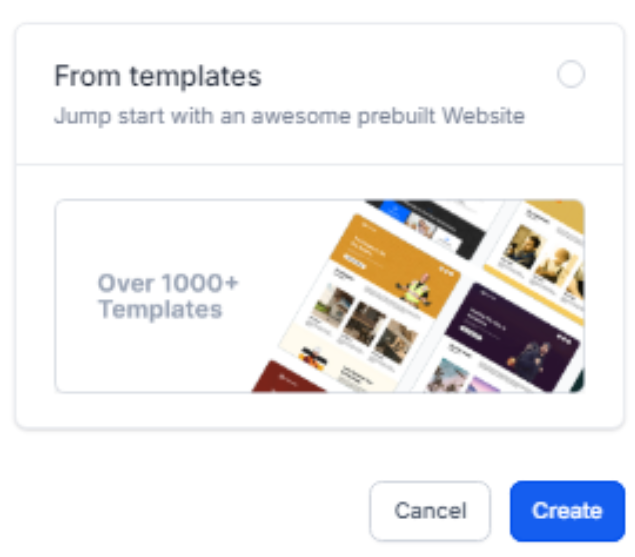
Pre-designed templates come with industry-specific sections that cater to common business needs, such as service pages, about sections, testimonials, and contact forms. These templates are fully customizable, allowing users to tweak fonts, colors, and layouts to better match their brand identity. They significantly reduce setup time while still maintaining a high level of quality and functionality, making them a go-to choice for those who need a polished website without the hassle of building one from scratch. Whether you’re launching a small business site, a portfolio page, or an e-commerce platform, templates provide the perfect foundation to get started quickly while ensuring your website looks professional and user-friendly.
Starting From Scratch
Building a website from scratch is ideal for businesses or marketers who:
- Desire complete creative control over every aspect of the website’s design and functionality.
- Want a truly one-of-a-kind design that stands out and reflects their unique brand identity.
- Operate in industries or niches that don’t align well with pre-built templates, requiring a more tailored approach.
Scratch builds provide the flexibility to create a website that is not only visually stunning but also incorporates advanced functionality to meet specific business needs. This approach is perfect for crafting a strong brand identity and ensuring the site is optimized for both aesthetics and performance. Whether it’s integrating complex features, creating a seamless user experience, or building around a specific vision, a custom-built website can help bring your ideas to life. In this guide, we’ll dive into step-by-step instructions on how to approach both custom-built websites and template-based designs, helping you choose the method that best fits your goals.
Building Go High Level Websites Using Templates
If you’re looking for a quick yet professional way to launch your website, templates are an excellent choice. They offer pre-designed layouts that save you time while still allowing for customization to suit your needs. Here’s a step-by-step guide to help you get started with templates in Go High Level (GHL).
Step 1: Accessing the Template Library
The first step is to locate GHL’s extensive library of customizable templates, which are designed to suit a variety of industries and website goals.
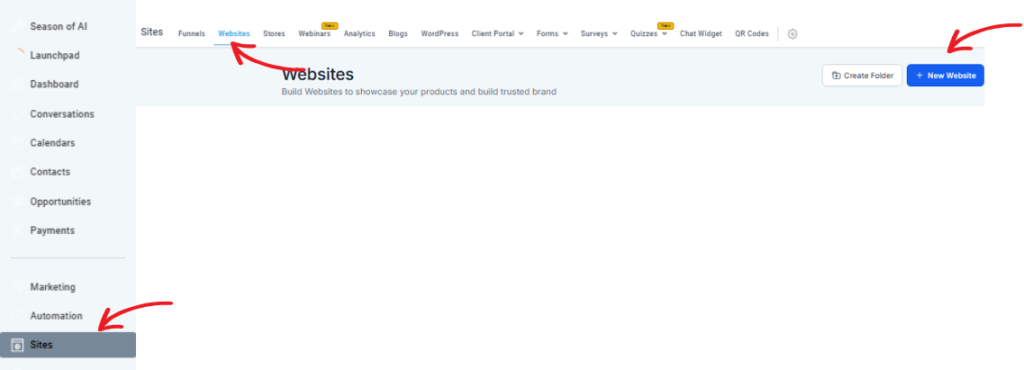
- Log in to your Go High Level dashboard and navigate to the Websites section on the sidebar.
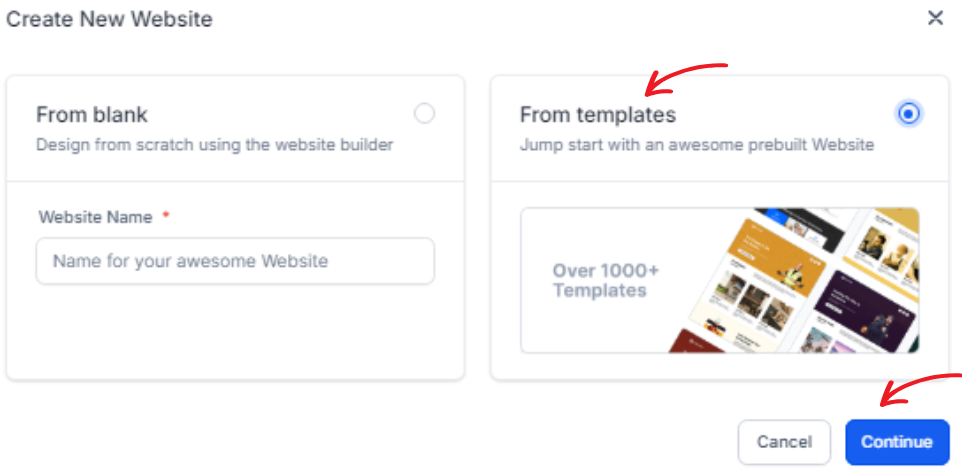
- Click on the “Create Website” button to start a new project.
- Once inside, you’ll find the Template Library, filled with a wide range of layouts specifically tailored for industries like marketing, e-commerce, healthcare, real estate, and more.
- Explore the library at your own pace by previewing templates. Each preview lets you see how the design and structure will look, helping you choose a layout that aligns with your website’s purpose and brand identity.
- After finding a template that resonates with your vision, click “Use Template” to add it to your project. The template will then load into your workspace, where you can begin customizing it to make it uniquely yours.
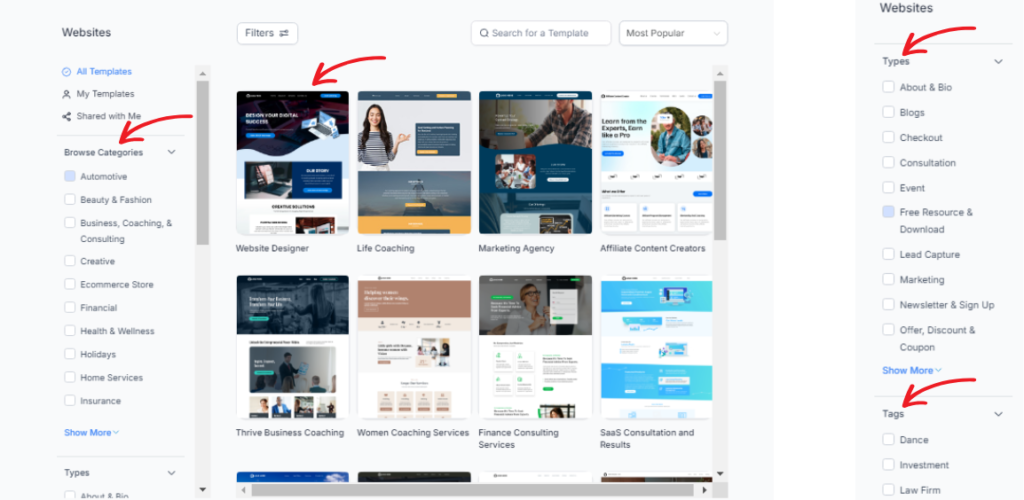
Templates are perfect for anyone—from beginners building a website for the first time to professionals looking for a streamlined process. By choosing a template, you can save hours of design work while still creating a polished and functional website that meets your requirements. Let the Template Library simplify your website-building journey!
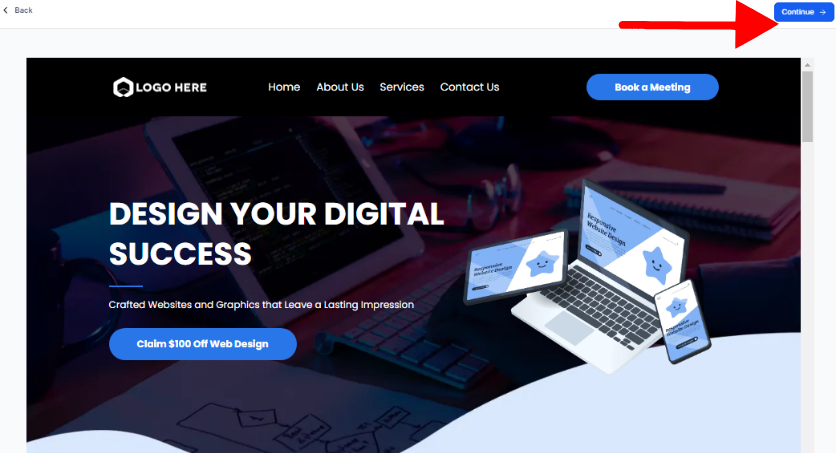
Step 2: Customizing Your Template
Templates are designed to be flexible and adaptable to your specific needs. Whether you’re creating a website, landing page, or email campaign, here’s how to make it uniquely yours:
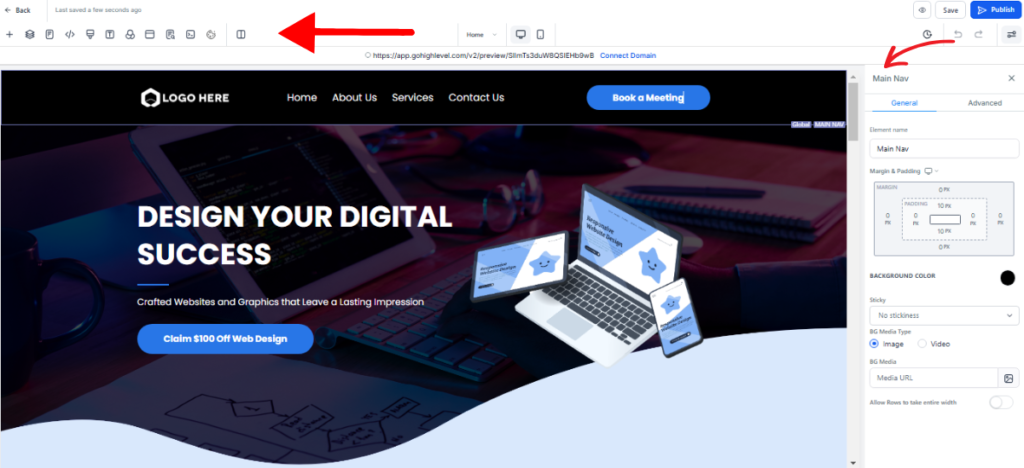
- Text and Images: Replace the placeholder content with compelling brand messaging and high-resolution visuals that resonate with your audience. Craft headlines and copy that reflect your unique voice and value proposition while ensuring the images align with your messaging.
- Colors and Fonts: Customize the template by aligning the colors and fonts with your company branding. Use your brand’s color palette and typography to create a cohesive look that strengthens identity and builds recognition.
- Sections: Tailor the layout by adding or removing sections to suit your needs. For example, include testimonials to build trust, FAQs to address common concerns, or remove sections that don’t align with your goals.
- Widgets: Enhance functionality by incorporating components like sign-up forms, call-to-action buttons, maps, or even countdown timers for limited-time offers. These elements can improve user interaction and drive engagement.
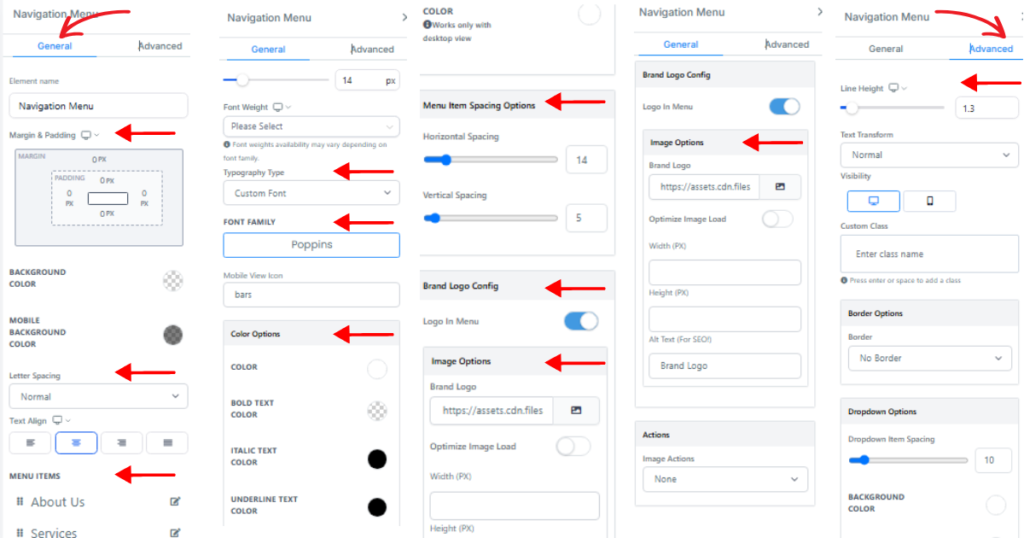
Customization within GHL is intuitive, offering drag-and-drop functionality and user-friendly tools that let you tweak the template’s structure and content with ease. With just a little time and creativity, you can transform a template into a unique, professional design that matches your vision and goals perfectly.
Step 3: Adding Pages and Features
While templates simplify the setup, you may need to create additional pages tailored to your website’s specific needs. These could include:
- About Us Page: Share your company’s story, mission, and values to help visitors connect with your brand. Consider including the company’s history, key milestones, and a team section to humanize your business.
- Service Pages: Highlight your offerings in detail by breaking them down into individual services or categories. Use clear descriptions, images, and even testimonials to showcase what sets your services apart.
- Contact Page: Make it easy for visitors to reach you by adding forms, phone numbers, email addresses, and physical addresses. You could also include a map for directions and links to your social media profiles for additional touchpoints.
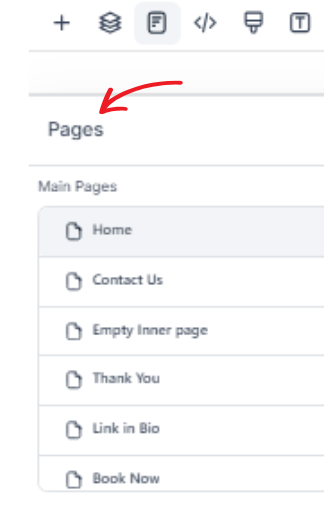
You can add and customize these pages through the Pages tab in your project. Ensuring your site is easy to navigate with a well-structured menu not only enhances user experience but also helps visitors find exactly what they’re looking for quickly and efficiently.
Step 4: Previewing and Publishing
Before launching your website, it’s important to preview it on different devices—desktop, tablet, and mobile—to ensure it’s fully responsive and functions seamlessly across all screen sizes. This step helps catch any layout issues or design inconsistencies that might affect user experience. Once you’re confident everything looks and works perfectly, follow these steps:
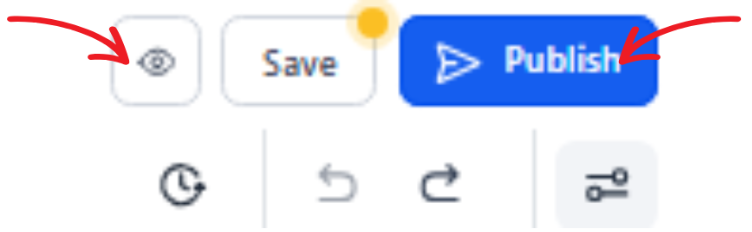
- Click Preview for a final review of your website and navigate through each page to ensure all elements are in place.
- Double-check for mobile friendliness by testing buttons, menus, and images on smaller screens, as a majority of users now browse on mobile devices.
- Finally, hit Publish, and your website will be live for the world to see!
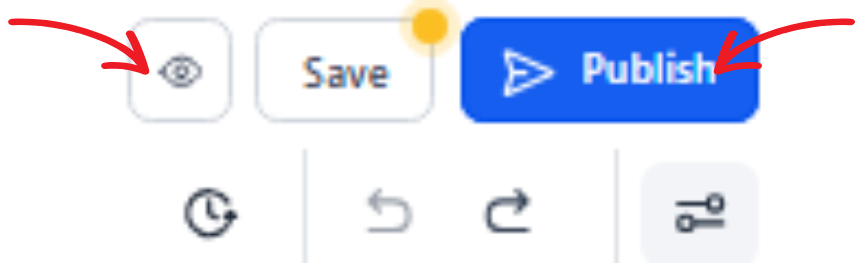
Using templates is a smart way to build your site quickly and efficiently. They strike a great balance between speed and functionality, making them an excellent choice for small businesses, freelancers, or anyone with limited time or resources to dedicate to web design. Templates also offer customizable features, allowing you to create a professional and unique look without starting from scratch.
Building Go High Level Websites from Scratch
For those who want to stand out or adhere to specific brand guidelines, building a website from scratch provides unmatched flexibility and creative freedom. It allows you to customize every aspect of your site to reflect your unique vision. Here’s a closer look at how to get started.
Step 1: Creating a Blank Canvas
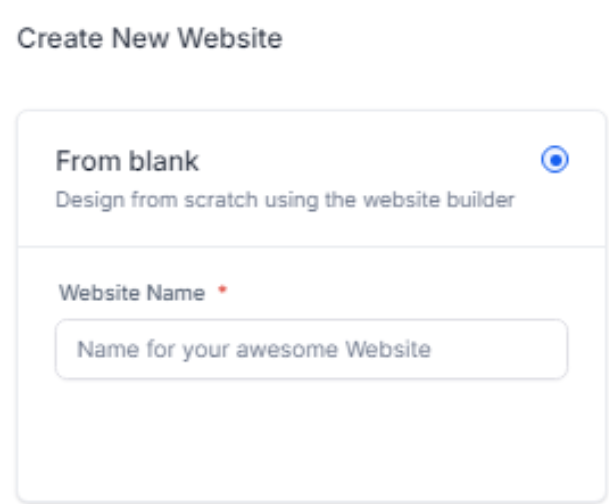
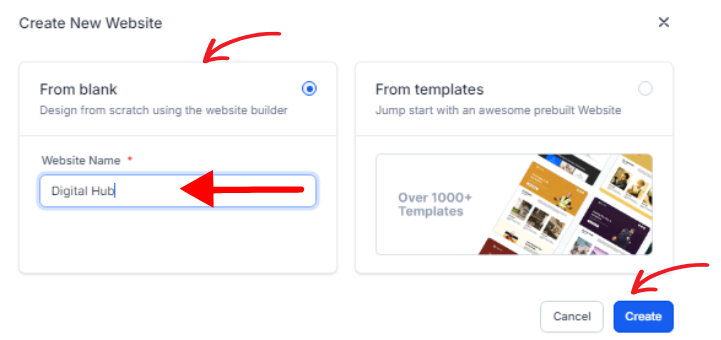
- Head to the Websites section, select “Create Website,” and choose the blank option to start from scratch. This gives you complete control over every design element, without pre-set templates getting in the way.
- Begin by setting up your basic configurations, such as your site name, which will be visible in search results, and the favicon, the small icon that appears in browser tabs. These small details help establish your brand’s identity from the outset.
- Take time to explore and familiarize yourself with the drag-and-drop editor—it’s intuitive and will be your primary tool for designing your site layout, adding content, and arranging elements exactly how you want. Don’t rush this step, as mastering the editor will make the entire process much smoother.
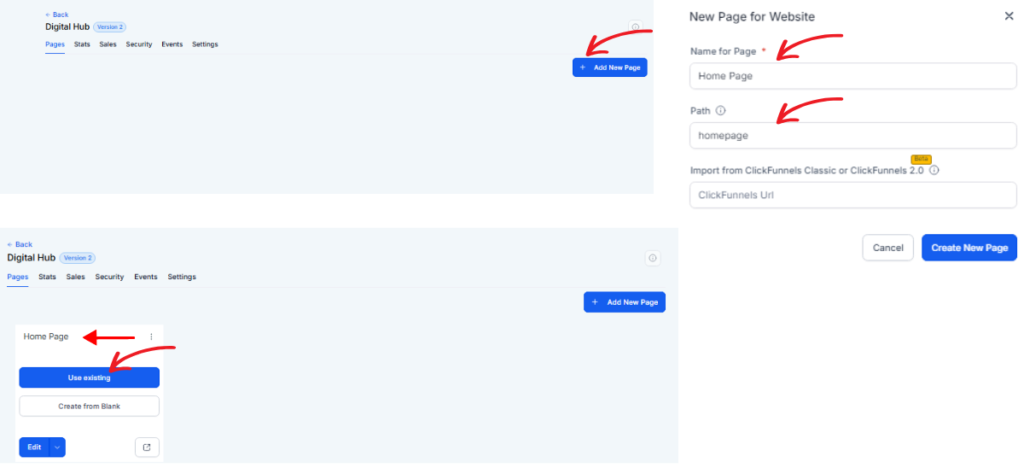
By starting with a completely blank canvas, the possibilities for your website are endless.
Step 2: Designing the Website Structure
Begin by creating your core framework to ensure your website is both functional and visually appealing:
- Header & Footer: These are the anchors of your website. Include your logo for brand recognition, a navigation menu for easy access to key pages, and contact details to make it simple for users to get in touch. You might also consider adding links to social media or a search bar for better usability.
- Homepage: This is your first impression, so make it count. Incorporate an eye-catching hero image or video, a tagline that clearly communicates your brand’s value, and a call-to-action button to guide visitors towards their next step, whether it’s learning more, signing up, or making a purchase.
- Other Pages: Plan the designs for your secondary pages carefully. Include product listings with clear images and descriptions, detailed service pages with benefits and testimonials, or a team introduction page to build credibility and trust. Adding elements like FAQs or resources can further enhance the user experience.
Breaking the structure down page-by-page ensures a clear layout, keeps users engaged, and helps them navigate your site with ease. A well-organized framework is the foundation of a successful website!
Step 3: Adding and Customizing Elements
GHL’s editor provides a wide range of versatile tools to create a polished, engaging website by incorporating text, visuals, and interactive elements seamlessly:
- Text and Images: Format headings, subheadings, and paragraphs to improve readability and ensure a smooth flow of information throughout your pages. Use high-quality, relevant images that align with your content to capture attention and enhance visual appeal. Take care to ensure your text and visuals are cohesive, drawing users further into your content.
- Buttons & CTAs: Call-to-action buttons are a key driver of conversions. Use contrasting colors to make them stand out and ensure they are easy to spot. Position them strategically at key touchpoints where users are naturally inclined to take action, such as at the end of a section or near a compelling offer. Clear and concise CTA text is essential to encourage clicks.
- Advanced Features: Enhance functionality by incorporating forms for lead generation, pop-ups to highlight promotions or announcements, embedded videos for dynamic content, and sliders to present multiple images or messages in a compact, engaging format. These features can help users interact with your site in meaningful ways.
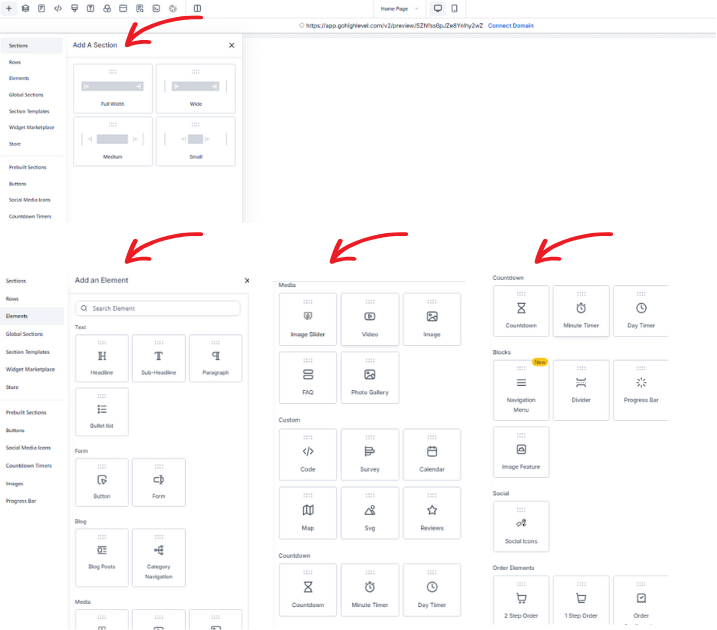
Additionally, optimize your site for SEO by including meta descriptions, alt texts for images, and relevant keywords that align with your target audience’s search behavior. Focus on creating fast-loading pages and a mobile-friendly design to enhance user experience and improve search engine rankings. By leveraging these tools effectively, you can create a site that not only looks great but also performs exceptionally in terms of engagement and conversions.
Step 4: Mobile Optimization
Given the growing importance of mobile traffic, it’s crucial to ensure your website provides a seamless experience across all devices. A responsive design doesn’t just improve usability; it also helps boost user engagement and retention. Here are a few key steps to optimize your site for mobile users:
- Resize images and text to fit smaller screens without compromising quality or readability. This ensures your content looks polished across all devices.
- Check essential elements like buttons, menus, and forms to ensure they are functional, clickable, and easy to use on touchscreens.
- Customize padding, margins, and spacing to improve navigation and readability, creating a smoother experience for users scrolling or interacting on mobile.

By paying attention to these details, you can create a mobile-friendly site that keeps visitors engaged and satisfied.
Step 5: Finalizing and Publishing
Before taking your site live, there are a few important steps to ensure everything is set up correctly:
- Review all pages thoroughly for broken links, spelling errors, or formatting issues. Take the time to double-check any forms, buttons, and interactive elements to make sure they function properly.
- Preview the entire website across different devices, including desktops, tablets, and smartphones, to confirm it’s responsive and looks great on all screen sizes.
- Once you’re confident everything is in order, publish the site and confirm its appearance online by navigating through each page as a visitor would.
Scratch builds may take more effort and time than using templates, but they allow for a completely customized design that truly reflects your brand’s identity and uniqueness.
Templates vs. Scratch Builds
Here’s a quick breakdown to help you decide which approach suits you best:
- Ease of Use: If you’re looking for simplicity and minimal effort, templates are the way to go. They come pre-designed, so you can quickly plug in your content and get started. On the other hand, creating from scratch offers complete design freedom, allowing you to customize every detail to align perfectly with your vision.
- Time: Templates are a huge time-saver. You can have something ready in minutes, making them perfect for tight deadlines. Building from scratch takes longer, as you’ll need to design everything yourself, but it results in a fully tailored end product that stands out.
- Best Use Cases: Templates work well for general business needs, such as simple websites, presentations, or marketing materials where speed and ease are priorities. Building from scratch is ideal for projects that require a unique brand identity, intricate details, or a creative edge that templates might not provide.
Tips for a Great Go High Level Website
Regardless of your approach, follow these best practices to create an effective and engaging website:
- Prioritize User Experience: A great user experience is essential to keep visitors engaged. Focus on simple navigation, fast loading times, and clear calls-to-action (CTAs) that guide users effortlessly toward their goals.
- Responsive Design: With users accessing websites on a variety of devices, from smartphones to desktops, it’s crucial to ensure your site looks and works flawlessly on all screen sizes. Mobile optimization is especially important.
- Consistency is King: A cohesive design builds trust and brand recognition. Stick to a unified color scheme, font styles, and tone of voice throughout the site to create a professional and polished appearance.
- Leverage Integrations: Make your website work smarter, not harder. Tools like GHL’s CRM, messaging capabilities, and email automation can streamline processes, improve functionality, and help you stay connected with your audience efficiently.
Build Your Website with Confidence
Whether you choose to work with templates or build your website from scratch, Go High Level provides all the tools you need to create high-converting, visually appealing sites that impress your audience. Templates are perfect for saving time and giving you a professional design with minimal effort while building from scratch allows you complete creative freedom and flexibility to tailor every detail to your unique business needs. Both options are designed to help you achieve your specific goals, whether you’re focusing on driving leads, boosting sales, or simply enhancing your online presence.
Now it’s your turn to take action. Start your website project with Go High Level today and take the next strategic step toward growing your brand, engaging your audience, and building your online presence with confidence. For further details and help Contact Us!